
.png)
Logging an incident is the easy part. Forsite manages what comes after. Every event, from a near miss to a lost-time injury, becomes a structured case: typed and classified, risk-assessed on the matrix for its category, investigated to root cause, and closed out against checklists with the evidence attached.
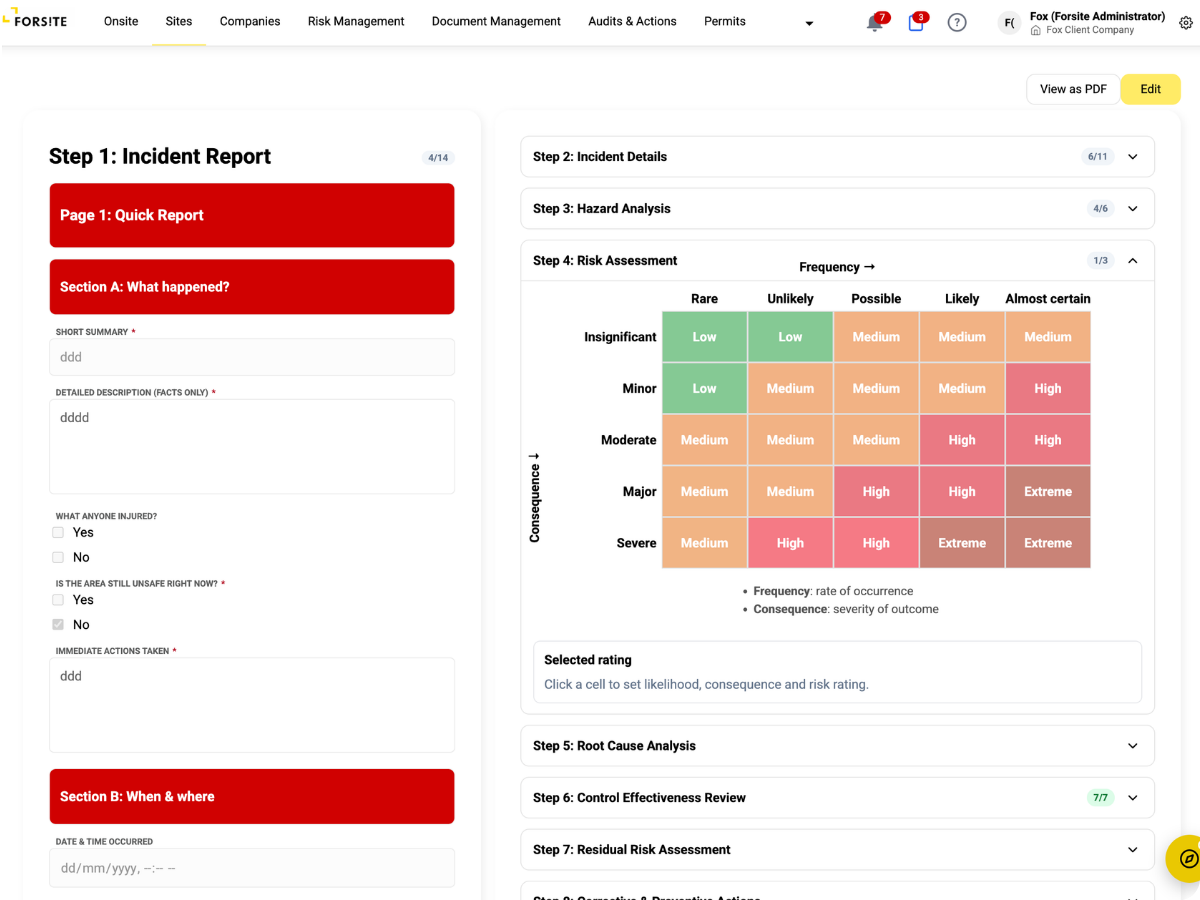
Type each event as an incident, near miss, injury event, hazard identification or observation, then classify it by detailed sub-type, criticality and affected zone. Sensitive events can be restricted to named people.
Root cause analysis, hazard analysis with control-failure capture, control effectiveness reviews and residual risk assessment are structured steps in the case, rather than attachments emailed around.
Management review, worker consultation, injury follow-up and regulator notification each have their own checklist with file upload. Injury events require consultation automatically. Nothing closes on a handshake.
Configurable rules fire on create or update: set a field, notify the right roles, escalate what matters. Serious events reach the right people without anyone forwarding an email.
Build incident report forms in a drag-and-drop builder with over 40 module types, including signatures, body-part pickers, image upload and site-zone selectors. Define your own workflow states and role-gated transitions so incidents move through exactly the process your organisation runs. When the case closes, export a structured, print-ready report that covers the full investigation, numbered section by section.
Follow an incident from first report through investigation, corrective actions and close-out, ending with the printed report.
1-25
risk score per event
Every
injury event needs consultation
Log What Happened, Fast
When something happens on your site, open a case in minutes and record the event while the detail is still fresh. Every open investigation and corrective action for your site sits in one place, so nothing quietly stalls halfway to done.
Investigations That Stand Up
Every event follows the same process, so how well an investigation is run no longer depends on who ran it. Injury events cannot close without worker consultation, and the finished case holds the evidence a regulator or your board will ask to see.
Report From the Field
Raise a near miss or an injury straight from your phone before you leave site, with photos and the zone captured on the spot. If you were involved, you are consulted as part of the investigation, so what you saw goes on the record.
One Standard Across the Portfolio
Every site investigates to the same standard, whoever runs the day to day. You get one auditable trail of what happened, what failed and what changed, across the whole portfolio, so your officer duties are backed by evidence rather than assurances.
.png)
%20(2).png)
%20(3).png)
%20(4).png)
“What we value in Forsite is the ability to manage a range of site and health and safety requirements across our national portfolio of properties — all within one simple to use web portal. There are regularly new features or enhancements made being deployed, which further improves the value of the solution to us.”
Simi Mukherjee







.png)