
.png)
A finding only matters if someone fixes it. Forsite turns every finding into a tracked action in one queue. An audit finding, an incident action, a critical-control verification that did not pass, a task you set for tomorrow: all of them arrive in the same list, each carrying the owner and the due date that make it someone's job rather than a note in the margin.
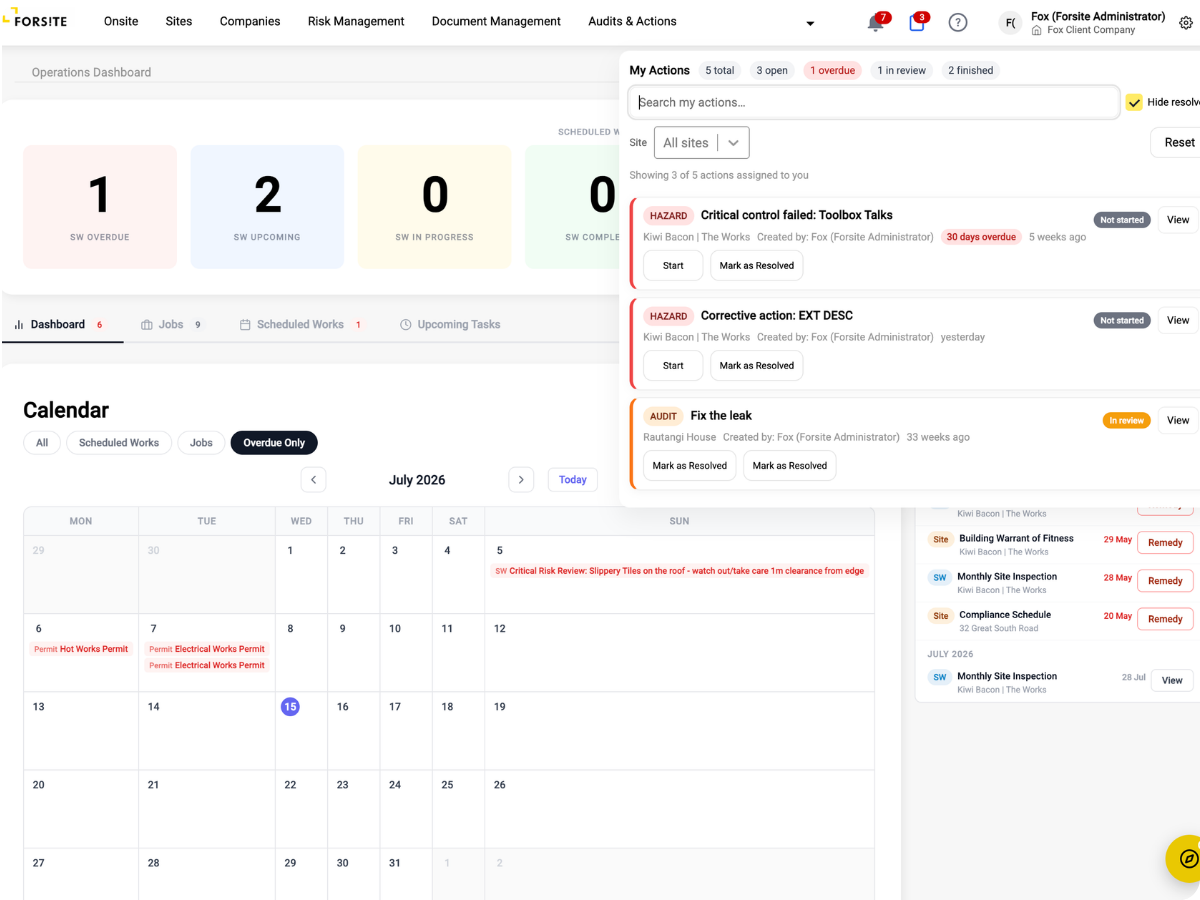
Actions raised anywhere in Forsite, from a failed critical control check to an incident close-out, are tracked in the same place.
Every action has a named owner and a due date, so ownership is built into the workflow rather than left to good intentions.
Actions from incidents can be verified after completion, so a completed action is one someone has actually checked.
When a critical-control verification fails, Forsite raises the corrective action for you and attaches a seven-day deadline. The fix is on the list before anyone has thought to add it, so a failed check never quietly disappears.
An action does not float free of the problem it came from. Each corrective action stays connected to the record that raised it, so opening the action takes you straight to the source behind it, and closing it lets you trace exactly what it resolved.
Watch a failed critical-control check raise a corrective action, get an owner and a deadline, and close out only once the fix is verified.
7-day
deadline on failed verifications
Every
action gets an owner
Nothing slips on your site
The day-to-day actions on your site sit in one list with owners and due dates: the task you set a contractor yesterday, the finding from this morning's walk, the fix an incident left behind. You see what is outstanding without chasing anyone.
Close-out you can prove
Every corrective action from an incident, an audit or a failed critical-control verification is tracked to close-out in one place. When you need to show a finding was actually resolved, the record is there rather than in someone's inbox.
Your actions, clearly assigned
The actions assigned to you arrive with a clear description and a due date, so you know exactly what needs doing and by when. Your completed work is recorded against the site as you go.
Findings that don't stall
Findings and failures across your portfolio do not stall in email threads. Every corrective action carries an owner and a deadline, and incident actions are verified before they close, so accountability holds on every site.
.png)
%20(2).png)
%20(3).png)
%20(4).png)
“What we value in Forsite is the ability to manage a range of site and health and safety requirements across our national portfolio of properties — all within one simple to use web portal. There are regularly new features or enhancements made being deployed, which further improves the value of the solution to us.”
Simi Mukherjee








.png)