
.png)
A permit to work is how you authorise dangerous work before it starts. Forsite makes that whole cycle digital. A request is raised against a standardised template, the right people approve or decline it, and the live permit sits against the job with its status and expiry in plain view. High-risk work no longer starts on a verbal say-so.
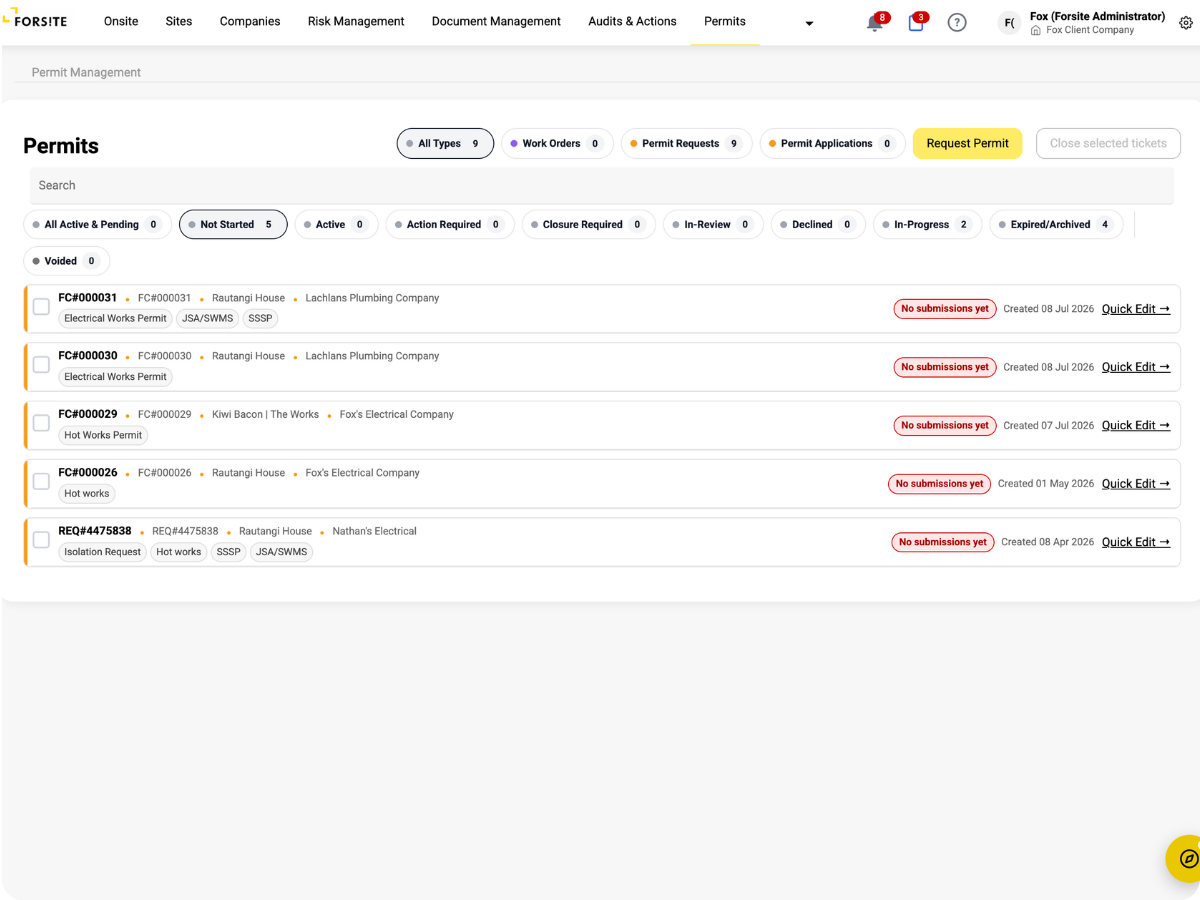
Permit templates built to your requirements make sure the same high-risk work is controlled the same way on every site.
Requests, approvals and declines are tracked, with notifications to the right people, so nothing waits in an inbox.
Every permit's status and history is on record, which makes audits and incident investigations straightforward.
Each permit attaches to the job it authorises and carries a validity window. An open permit stays tied to real work on a real site, and its expiry is tracked so an out-of-date permit is not mistaken for a current one.
A permit is only as good as its enforcement at the gate. Because each site's check-in journey verifies permits alongside inductions, a worker arriving for confined-space or hot works can be held until the right permit is approved and still valid. The authorisation and the person on site finally line up.
Watch a permit requested against a template, approved by the right person, tracked against the job, and closed out on the record.
Every
permit tracked to expiry
One
permit standard, every site
See what's authorised today
Open your site and see which permits are live and current, and which high-risk jobs are still waiting on sign-off. You know at a glance whether a crew is cleared to start or working without a valid permit.
Set the rules once
Decide what work needs a permit and build the template that controls it, such as hot works and confined-space entry. Every request runs through the same checks, and the approval trail is there when an investigation asks how the work was authorised.
Request from your phone
Raise a permit against the site's template before you arrive, and get notified the moment it is approved or sent back. You know exactly what your crew is cleared to do, so no one turns up for confined-space work without the authorisation in hand.
Consistent control, provable
Every site in your portfolio controls high-risk work the same way, against the same standard. When something goes wrong, you can show that the work was authorised properly, by the right person, rather than hoping a paper trail turns up.
.png)
%20(2).png)
%20(3).png)
%20(4).png)
“What we value in Forsite is the ability to manage a range of site and health and safety requirements across our national portfolio of properties — all within one simple to use web portal. There are regularly new features or enhancements made being deployed, which further improves the value of the solution to us.”
Simi Mukherjee







.png)